


Dog Translator - Human to Pet
0.00.00 Reviews
App Specs
- Version
- 1.0.19
- Updated On
- License
- Free
- Downloads
- 10,000+
- Developer
- DEHA STUDIO
- Categories
- Lifestyle
- Platform
- Android
Screenshots
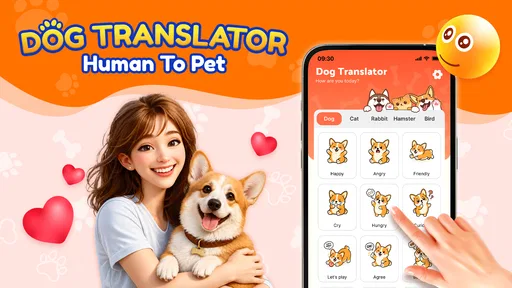
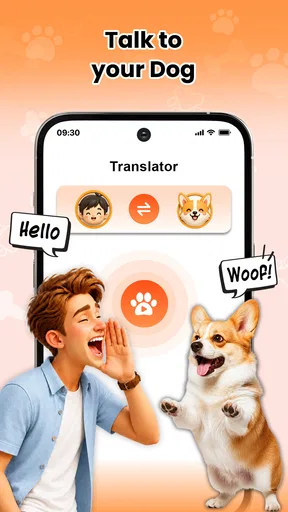
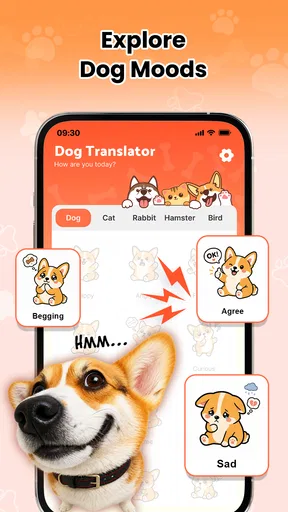

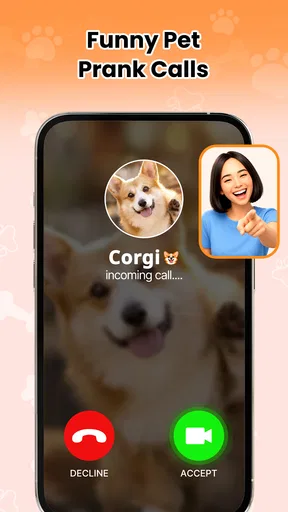
 Analysis by AppCompare
I tried Dog Translator - Human to Pet as a lighthearted lifestyle app, and its appeal is easy to understand: you speak into your phone, the app turns that input into a playful dog-style sound, and you use the result to create a silly moment with a pet or a friend. It is not something I would install for serious animal communication, but it can be a pleasant little diversion when the goal is laughter rather than accuracy.
The app is free, aimed at everyone, and developed by DEHA STUDIO. It has reached over ten thousand installs, which places it among the smaller, more novelty-focused apps in this space. I see that as useful context: this is best approached as a simple entertainment tool, not as a mature pet-care platform or a replacement for training advice.
From a spoken phrase to a playful dog reaction
I find the idea works best when I think of it as a tiny audio performance rather than a literal conversation: I choose a short line, speak clearly, and let the dog-style sound set up the joke. That framing also makes it easier to judge whether the moment is landing with the people—and, more importantly, the pet—nearby.
Starting with the right expectation
The first thing I would tell a friend is to treat the name “translator” as part of the joke. A phone cannot reliably convert human language into a dog’s thoughts, and a sound effect cannot reveal whether a dog is happy, anxious, hungry, or uncomfortable. The useful question is not whether it truly understands an animal. The useful question is whether it gives you an amusing way to interact with a dog or stage a prank call.
That distinction matters because it changes how you use the app. If your dog is barking at the door, hiding, panting heavily, or showing another sign of distress, this is not the tool I would reach for. I would first check the environment and the animal’s behavior. If everyone is relaxed and you simply want to make a short, funny recording or surprise someone during a call, the app makes much more sense.
Its lifestyle category also fits this role. It sits closer to a novelty companion than to a training utility. I found the best results came when I planned a tiny scenario before opening it: asking a pretend question, responding with a playful “dog answer,” or setting up a harmless joke for someone who enjoys animal humor.
How I would use it step by step
I start by choosing a quiet place and deciding what I want the final moment to be. That preparation sounds minor, but it prevents the experience from becoming random noise. A short sentence with a clear punchline works better than a long explanation. For example, I might say a cheerful greeting, wait for the generated dog sound, and then act as though the pet has delivered a dramatic reply.
Worth Reading Before You Choose

Flipboard Shows What News Apps Must Do Beyond the Feed

Switching to Android Auto Means Rethinking Your Driving Routine

Google Calendar Makes a Crowded Week Easier to Manage

Ludo King Makes the Most of the Minutes Between Plans

Baby Panda World Brings Quick Play to Modern Phones, but Its Game Library Feels Busy

ESPN’s Live Game View Makes Following Close Games Easier
Next, I speak into the phone in a normal, audible voice. I would avoid talking while a television, fan, or group of people is competing with me. With any voice-based novelty app, clean input gives the interaction a better chance of feeling intentional. I also keep the phone at a comfortable distance rather than placing it directly beside a dog’s ears.
After the voice is processed into a funny dog sound, I listen to the result before repeating the activity. This is where the app becomes more entertaining than simply making a random noise: I can use the first output as a cue for the next line. A short back-and-forth feels more like a sketch, while pressing the feature repeatedly without a plan quickly becomes repetitive.
My practical tip is to keep the exchange brief. Two or three turns are usually enough for a joke. If I keep generating sounds for too long, the novelty fades and the dog may lose interest. The app works best as a small ingredient in an activity, not as the entire activity.
Making the handoff from phone to pet
The most important handoff is from the screen to the animal. I would not assume that a dog interprets the sound as language. Some pets may ignore it, some may look toward the phone, and others may become excited or unsettled. Their reaction is the useful feedback here, but it should be read as ordinary animal behavior rather than proof that a translation has taken place.
I would begin with the volume kept comfortably low and watch the dog’s body language. A relaxed posture, normal movement, and willingness to remain nearby are reassuring signs. Turning away, flattening the ears, hiding, growling, or becoming unusually agitated would be my signal to stop. The app is optional entertainment; the pet’s comfort is not optional.
This is also why I prefer using it with a dog who already knows me and is comfortable around phones. A nervous rescue dog, a puppy that is still adjusting to a home, or an older animal sensitive to sound may be better served by calm interaction without the app. In those cases, the usual alternative—speaking gently and observing behavior—offers more value and less stimulation.
There is another handoff when the app is used socially. If I am showing it to a friend, I would explain that the output is for fun before playing it near their pet. Not every owner wants unfamiliar sounds directed at an animal, and not every dog enjoys being part of a prank. Asking first keeps the joke friendly instead of turning it into an uncomfortable surprise.
Turning the output into an everyday use case
A realistic scenario would be a rainy afternoon when a family is stuck indoors. One person opens the app, says a playful question, and lets the phone produce the dog-style response. Another person invents a reply, and the family treats the exchange as a short comedy routine. The dog may glance over, ignore it, or join the room, but the human interaction remains the main event.
I can also imagine using it during a casual video call with a friend who loves dogs. Rather than interrupting the whole conversation with repeated noises, I would prepare one short line, play the result once, and then move on. That makes the app a conversation starter instead of an annoyance. The same approach works for a quick family joke, provided nobody mistakes the sound for a genuine animal-care feature.
A less obvious use is testing how a household reacts to novelty before introducing a new sound-based toy or gadget. I would not treat this as a scientific test, but it can remind people to observe the pet’s response and keep stimulation controlled. The app is useful here only as a gentle prompt to pay attention, not as a diagnostic instrument.
What the result actually delivers
The result is a playful audio response that gives a spoken phrase a dog-themed twist. That is enough to create a laugh when the timing is right. I enjoyed it more when I supplied the imagination myself: the app provided the sound, while I created the character, situation, and punchline around it.
This is a key difference from a conventional pet-care app. A training app might organize commands, routines, or progress. A pet-health app might focus on records and reminders. A camera app might capture a real moment. This one is much narrower and more immediate: it gives you a humorous interaction in the moment, without asking you to build a long-term routine.
That narrow purpose is both its strength and its weakness. Because the idea is straightforward, I can understand it quickly and use it without committing to a complicated setup. At the same time, anyone expecting reliable interpretation of barking, emotional analysis, or meaningful behavioral guidance will likely feel disappointed. The fun comes from pretending, not from receiving dependable information.
I would also keep the output away from situations where a sound could create confusion. A dog reacting to a doorbell, a warning bark, or a household instruction should not be managed through a novelty effect. If the outcome matters, I would rely on direct observation, established training methods, or advice from a qualified professional instead.
Where the workflow breaks down
The first point of friction is the gap between the playful label and the real capability. Calling something a translator naturally raises expectations. In practice, I use it as a sound-based joke. The more literally someone approaches the concept, the less satisfying the experience becomes.
The second problem is repetition. A novelty sound can be amusing once, but it does not automatically create a lasting activity. I would not recommend installing it for someone who wants a deep library of pet tools or a structured dog-training companion. A standard training resource, a camera for capturing reactions, or simply a favorite game with the dog would be a better choice for those goals.
Input quality can also affect the flow. If I speak too quietly or use the app in a noisy room, the moment loses its rhythm. That is not a serious obstacle, but it means the best experience requires a little preparation. The app is less convenient as an instant party trick when several people are talking at once.
There is a social limitation as well. Some people enjoy silly prank calls, while others dislike being recorded or surprised. I would only use the prank-oriented side with someone who is comfortable with that kind of humor. The safest version is a transparent joke among friends, not an attempt to embarrass a stranger or pressure someone into participating.
The app also needs restraint around animals. A dog that reacts dramatically is not necessarily having fun. I would stop after the first uncomfortable response rather than trying to get a more entertaining reaction. That makes the experience less spectacular in some cases, but it is the responsible trade-off and keeps the app in its proper place.
Who should install it and who should skip it
I think it suits casual users who want a free, uncomplicated novelty for a family laugh, a playful pet interaction, or a short prank between consenting friends. It is especially appropriate for someone who enjoys improvising little scenes and understands that the humor comes from the performance around the sound.
I would skip it if I were looking for dog training, health monitoring, behavioral interpretation, or a dependable way to communicate with an animal. I would also avoid making it part of a nervous dog’s routine. In those situations, calm observation and established resources are more useful than a generated novelty response.
Device compatibility is reasonably approachable for older Android phones because the listed minimum operating system is Android seven point zero. The current release is version one point zero nineteen, so Android users who meet that requirement can consider it without needing a recent flagship device. I would still keep expectations modest: operating-system compatibility makes installation possible, but it does not turn a small joke app into a full pet platform.
The age rating of Everyone makes the concept accessible to families, although younger users still need guidance about volume, consent, and animal reactions. “Suitable for everyone” does not mean every dog will enjoy every sound. An adult should demonstrate the first use and make it clear that stopping is the right choice when a pet appears uncomfortable.
My recommendation after following the complete flow
From the initial idea to the spoken input, the generated response, and the handoff to a real pet or friend, the app succeeds when I treat it as a short performance. I decide on the joke, speak clearly, use the output once or twice, and pay attention to the people and animals around me. That workflow gives the app a clear purpose and prevents the novelty from taking over.
For me, the strongest insight is that the phone is not the star of the experience. The app supplies a prompt, but the outcome depends on timing, imagination, and respect for the dog’s boundaries. A thoughtful user can turn a basic sound effect into a funny shared moment; an impatient user can turn the same feature into repetitive noise.
My honest recommendation is to try it when you want a harmless laugh, not when you need an actual translation. It is free, easy to understand, and clearly designed for casual entertainment. Just keep the volume sensible, ask before involving someone else’s pet, and remember that a dog’s behavior should be interpreted through responsible observation rather than through a novelty app.
DEHA STUDIO has positioned this as a small lifestyle experience, and that is exactly how I would use it. It does not replace the usual alternatives in training, care, or communication, but it does not need to. Used briefly and with the right expectations, Dog Translator - Human to Pet can add a funny twist to an ordinary afternoon. The latest release, version one point zero nineteen, keeps the app current enough to try, while its over ten thousand installs suggest a modest audience built around curiosity and quick entertainment rather than long-term pet management.
Pros
- Simple interface makes it easy to start recording sounds quickly.
- Includes playful sound effects for entertaining interaction with your dog.
- Useful as a fun activity to observe your pet’s reactions and habits.
- Lightweight design should work smoothly on most modern smartphones.
- Can encourage owners to spend more attentive
- interactive time with pets.
Cons
- Does not provide scientifically verified translations of canine communication.
- Some features or sound packs may require in-app purchases.
- Repeated noises can confuse
- annoy
- or overstimulate sensitive dogs.
- Results depend heavily on your pet’s mood
- breed
- and individual behavior.
- Advertising may interrupt use
- especially in the free version.
FAQs for Dog Translator - Human to Pet
What is Dog Translator - Human to Pet and how does it work?
Dog Translator - Human to Pet is an entertainment app designed to simulate communication between people and dogs. It typically converts selected phrases into playful sounds, whistles, or humorous “dog language” messages, while also offering sound effects and interactive buttons. The app should not be considered a genuine translation tool, because current technology cannot reliably translate human speech into meaningful canine language.
Can Dog Translator - Human to Pet really translate what my dog is saying?
No. Dog Translator - Human to Pet is intended for fun rather than accurate interpretation of a dog’s thoughts or vocalizations. A dog’s bark, whine, growl, and body language can have different meanings depending on its breed, surroundings, health, and emotional state. The app may create amusing responses, but it should never replace observation, responsible training, or advice from a qualified veterinarian or animal behavior professional.
Is Dog Translator - Human to Pet suitable for all dogs?
Most dogs can be around the app, but individual reactions may vary. Some pets may find unfamiliar barking, whistles, or loud sound effects exciting, while others may become nervous, confused, or overstimulated. Begin with the volume turned down and watch your dog’s body language carefully. Stop using the app if your pet shows signs of stress, such as hiding, trembling, excessive barking, pinned-back ears, or repeated attempts to leave.
Does Dog Translator - Human to Pet require an internet connection or special permissions?
The exact requirements can depend on the version installed and the device platform. Basic soundboards and prerecorded features may work offline, while voice recording, speech processing, advertisements, analytics, or additional content may require an internet connection. Before granting access, review the permissions requested by the app, especially microphone, storage, and notification permissions, and check its store listing for current privacy and connectivity details.
Is Dog Translator - Human to Pet free to download, and are there advertisements or in-app purchases?
The app may be available as a free download, but free versions commonly include advertisements, optional purchases, or premium features. These can vary by Android or iOS release, region, and developer updates. Before downloading, review the current store page for pricing, subscription terms, and in-app purchase information. If children use the app, enable parental controls to help prevent accidental purchases or exposure to unsuitable advertisements.


